
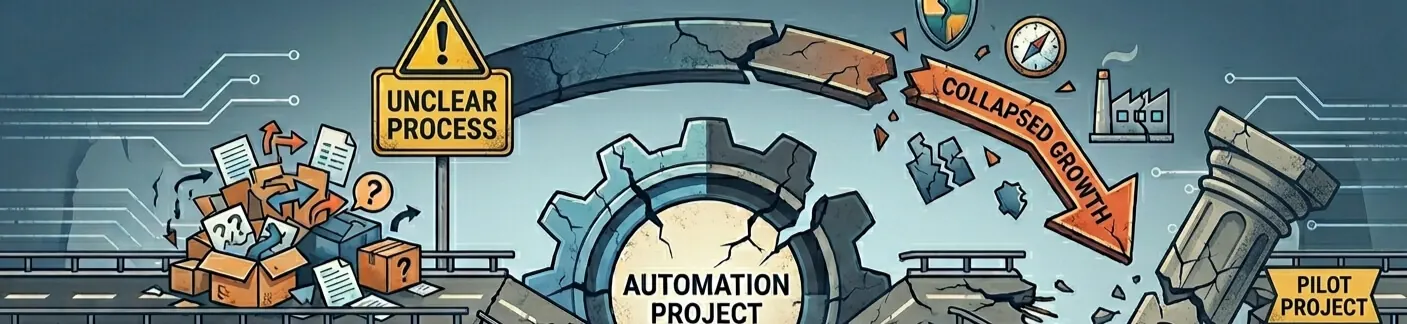
Why Most Automation Projects Fail
Most automation projects don't fail because of bad tools. They fail because teams try to automate the wrong thing.
That might sound obvious, but in practice it happens constantly. And honestly, after working with enough clients on this, I've stopped being surprised by it. The excitement is real, the intent is right, and the tools are often perfectly capable. What's missing is a stable, well-understood process underneath.
When a workflow is chaotic, poorly defined, or full of exceptions that nobody has properly mapped out, automating it doesn't fix any of that. It just makes the chaos move faster. Deloitte put it plainly in their 2025 AI value report: don't automate broken processes, because you'll freeze existing dysfunction into code. Most business automation projects don't fail because of bad tools. They fail because teams try to automate the wrong thing. That's exactly what we see on the ground.
Author: Peter
Published: Mar 29, 2026
The Gap Between What People Expect and What Actually Happens
Teams usually come in with a few assumptions. Automation will save time immediately. It will remove the need for manual work. Once it's set up, it runs itself. And humans can step back.
Some of that is true, eventually. But it's not where you start.
Real workflows are full of incomplete data, inconsistent inputs, edge cases, and small variations that never show up in a demo. A lead form that comes in half-finished. A customer request that doesn't match any of the standard templates. A CRM field that three different people have been filling in three different ways for two years. These are the things that break systems.
A lot of what looks like a software failure is actually a workflow failure. The system breaks because the business logic was never fully defined, or the exceptions were never thought through, or the process worked differently depending on who was doing it.
This is also why "it should be easy to automate" is one of the most dangerous sentences in this industry. It usually means nobody has stress-tested the process against reality yet.
The Five Things That Sink Most Projects
1. Automating a broken process
If the underlying workflow doesn't make sense when a human does it manually, automation won't save it. It will just scale the damage faster. Before touching any tool, the question worth asking is: does this process actually work as it is? If the honest answer is no, process redesign comes first.
2. Unclear decision logic
A system can move tasks around and collect data perfectly well, but when it hits an ambiguous case, it needs rules. If those rules don't exist, automation becomes guesswork. A lot of teams know what should happen in broad terms but haven't defined what to do when things don't fit the standard scenario. That gap is where projects quietly fall apart.
3. Not keeping humans in the loop
I've seen this go both ways: either teams trust the system too much too early, or they build in so many manual checkpoints that nothing actually runs faster. The right approach is somewhere in the middle. A human review should always be designed into the workflow, especially when the system is handling decisions that still carry real consequences. McKinsey's 2025 workplace research makes the same point more broadly: humans remain central to where AI actually creates value.
4. Overengineering before you've learned anything
I've seen teams spend months building something architecturally impressive that nobody ends up using. When the focus shifts from solving a real problem to building something that looks good in a walkthrough, you end up with complexity without adoption. That's one of the fastest ways to waste a project budget.
5. Technical fragility and shifting foundations
Even a perfect process can be derailed by what's happening under the hood. We often see projects fail because the "plumbing" wasn't built for reality. This usually shows up in two ways: dirty input data and shifting API landscapes. If a system expects a clean date format but gets "Next Tuesday" written in a text field, the logic collapses. Similarly, relying on an external AI endpoint or a third-party tool means you are building on moving ground; one unannounced update to an API schema can break a workflow overnight.
The fix isn't just "better code" but it is resilience through testing. You have to move beyond the "happy path" and intentionally try to break the system with bad inputs, missing fields, and simulated downtime. Extensive stress-testing against every weird edge case you can imagine is the only way to ensure that when the technology inevitably shifts, your automation doesn't just go dark.
What Actually Works
The projects I've seen succeed tend to follow a pretty consistent pattern.
Start with one workflow. Not five. Not a platform-wide rollout. Pick one process that is already reasonably stable, and automate that.
Then bring in AI where decisions happen, not everywhere. That means using it for things like routing, classification, extraction, prioritisation, or drafting. Places where the system genuinely reduces manual work without pretending to replace judgment entirely.
Keep human review in from the start. This matters more than people expect. It gives you a safe way to catch errors early, understand where the edge cases actually live, and refine the logic before you scale. It also helps with adoption, because people experience the system as support rather than something that's replacing them.
Then iterate. Good automation is not done when it launches. It improves over time as the process becomes clearer, the exceptions become visible, and the rules get sharper. The first version is always the roughest.
This approach works because it matches how real businesses operate. Imperfectly at first, then better through feedback. A broader AI roadmap for business owners explains in more detail what steps need to be followed and/or checked.
If you're not sure whether a workflow in your business is actually ready for automation, I can take a look with you and point out where it will likely break. In most cases, it's visible pretty quickly.
Book a Strategy Session